Ninetycat – mini CAT control Programm für Yaesu FT-991A
Ninetycat is a mini Windows CAT control tool for the Yaesu FT-991A.
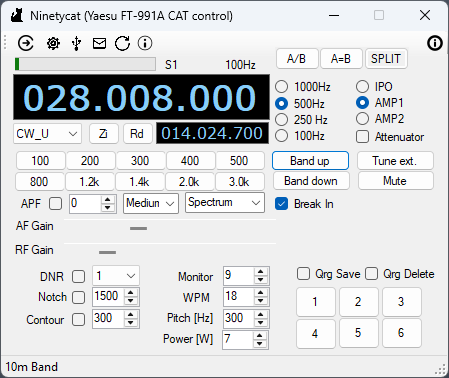
main window

cw message
Purpose of this tool
Direct and fast acesss to the most important settings mainly for CW operation during casual QSOs and contest operation and connect the tool to Ucx-Log via UDP to use assissted operation, e.g. automatically set the QRG by clicking on an entry in the DX-Cluster window.
Overview
- Display and change QRG via mousewheel (step width can be selected 1000/500/100/10Hz)
- switch between Bands
- switch Pre-Amp and attenuator
- ZIN – easy zero beat function
- switch Break-In on/off
- control AF Gain and RF gain
- select filter bandwidth
- select output power
- select cw keyer speed
- select cw pitch tone
- select cw monitor volume
- S-Meter display
- tune option for external ATU (switch to AM, send carrier signal for 1s, switch back to mode before tuning)
- Playback Keyboard shortcut
- support for Split operation
- edit CW Memory and playback via keyboard shortcut
- save temporarily QRGs (6 slots), considering also Split operation
- toolbar button to switch off filtering at once (APF, DNR, Notch, Contour)
Keyboard shortcuts
- F1 – Playback CW Memory #1
- F2 – Playback CW Memory #2
- F3 – Playback CW Memory #3
- F4 – Playback CW Memory #4
- F5 – Playback CW Memory #5
- z – Zero Beat
- q – Freq minus 1000 Hz
- w – Freq plus 1000 Hz
- a – Freq minus 500 Hz
- s – Freq plus 500 Hz
- y – Freq minus 100 Hz
- x – Freq plus 100 Hz
- p – APF on/off
Configuration
- Select COM ports. Be sure to select the right ports for enhanced and standard port. You can check port numbers it in the Windows Device Manager. The “Enhanced COM Port” is for sending/receiving CAT command. The “Standard COM Port” for controlling PTT.
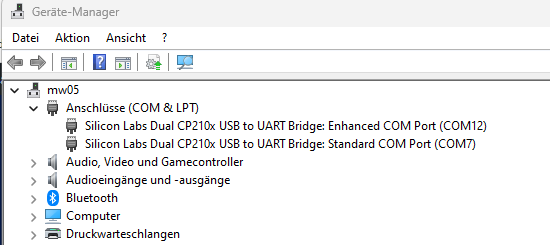
Comport Übersicht
- RX Setup Menu -> 033 CAT RTS : DISABLE
- Select baud rate as configured in the Ft-991A
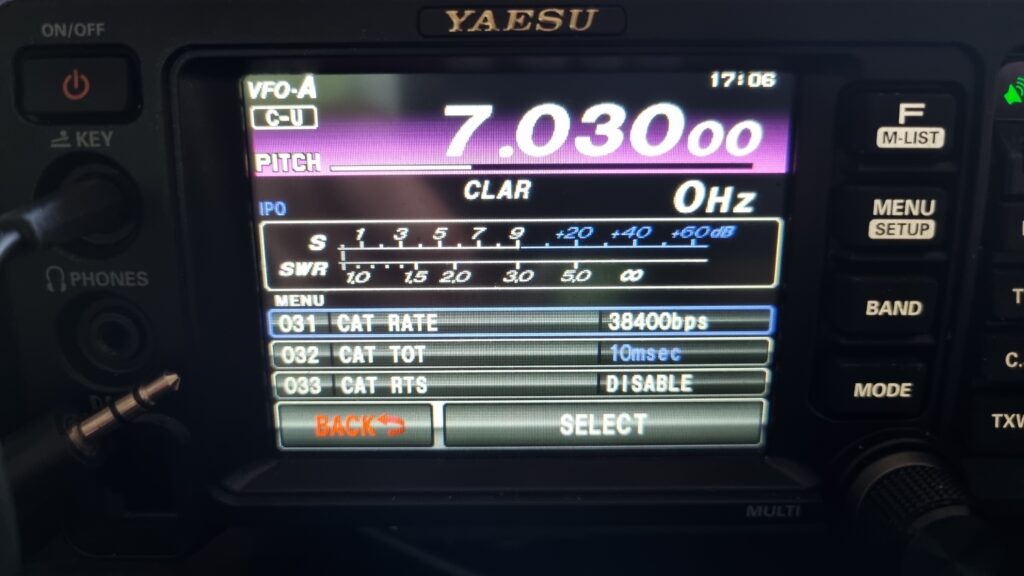
Comport Einstellungen
Maybe the anti virus programm will complain when you start the programm, sorry I don’t know why. But it’s a false positive message. You can check by scanning a single file or folder with defender -> Locate the file or folder in File Explorer -> Right-click it -> Select „Scan with Microsoft Defender.“ On some versions of Windows, you may need to click „Show more options“ first.
Download
Latest Version: v1.0.0.4 from 26-OCT-2025
Download: ninetycat_v1.0.0.4.zip